
The reports module
The full set of reports, how to run one for a range of dates, and why the same report gives the same answer on a device and in the portal.
2 min read
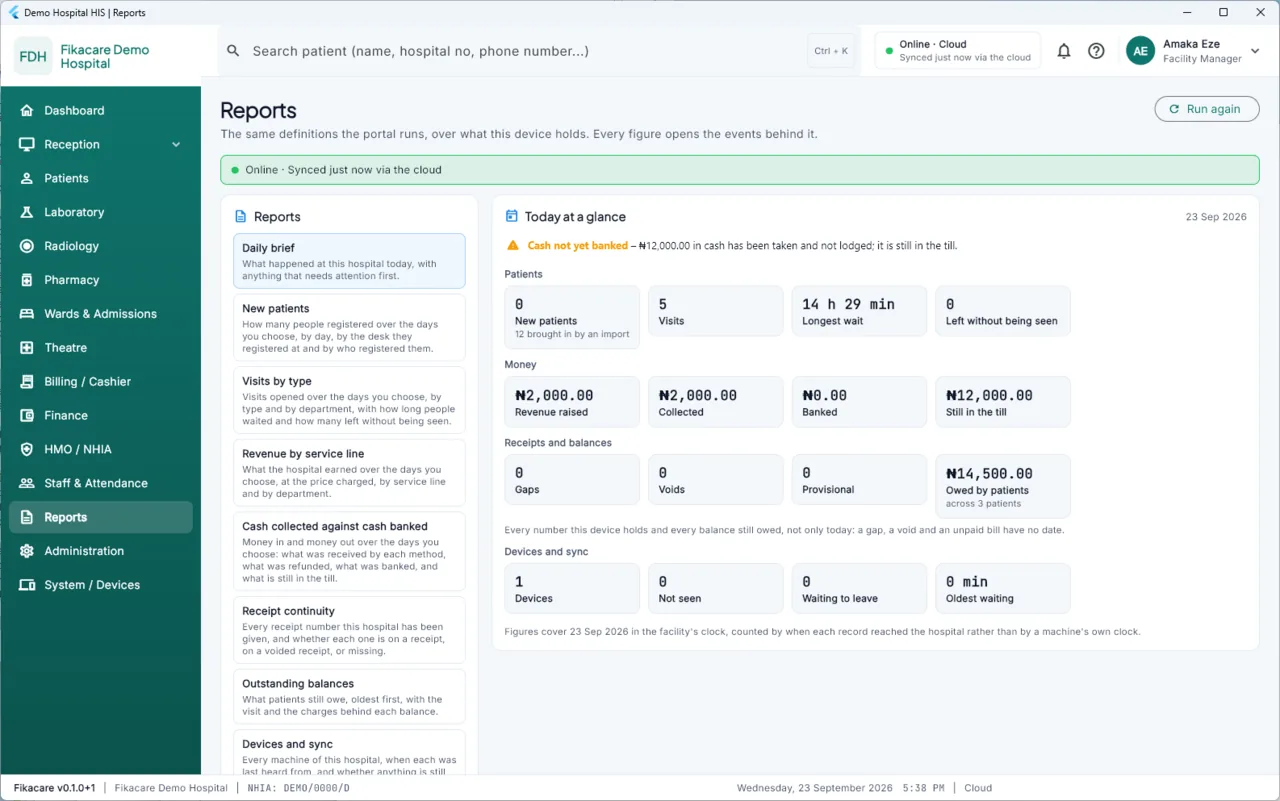
Choose Reports in the sidebar, or All reports from the daily brief.
Running one
Choose the report, choose the dates, run it. Print it or export it.
Reports run on the machine from the records it holds. They do not wait for a connection, and a report run during an outage is a real report of everything that machine knows — with the banner saying how current that is.
The same report, everywhere
Each report is defined once and run identically on a device and in the portal. The revenue figure a manager sees on the hub and the one the owner sees in the portal from home are the same query over the same records.
This is why the two do not drift, and why "the system says one thing and the portal says another" is not a conversation you have to have. If a device and the portal ever differ, it is because one has seen records the other has not yet — the banner and the portal's own sync state both say so.
Three kinds
Operational — registrations, visits, waiting times, the queue. Clinical — diagnoses, what the hospital actually treats. Financial — revenue by service, collections, discounts, what is owed.
Which you can run is your role, on a machine that carries the records — see Who can see what.
Every report opens
As on the dashboard, every figure drills down to the records behind it, on the device and in the portal.