
The patient profile
Everything about one patient in one place: clinical summary, visits, records, payments and documents.
2 min read
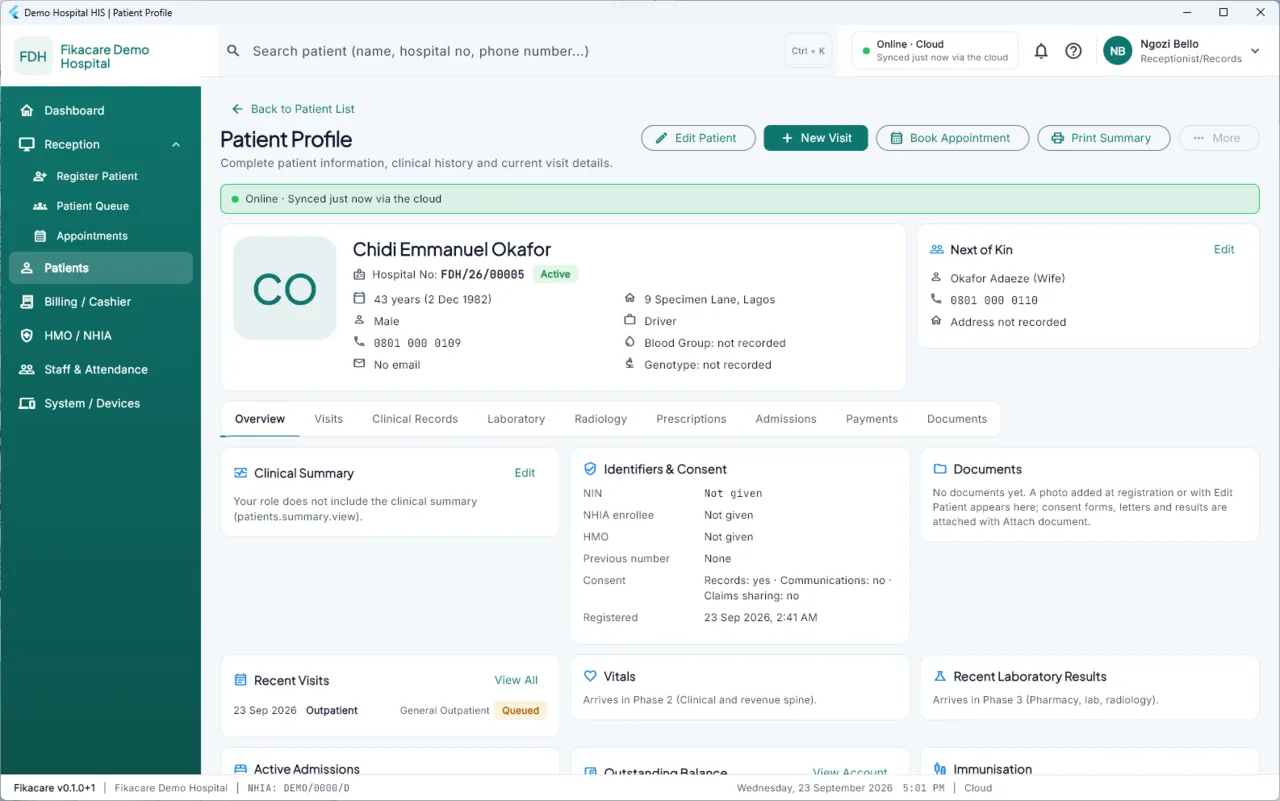
The top
The patient's name, hospital number, age, sex and phone, with the actions that matter most: Edit Patient, New Visit, Book Appointment, Print Summary, and More.
The clinical summary
The short version of this patient that everybody needs: allergies, chronic conditions, current medications, active problems, the last visit and the next appointment.
Allergies and current medications carry a stricter banner, escalated one level and impossible to dismiss. If this machine has not synced, an allergy recorded elsewhere this morning is not here yet, and the screen says so rather than presenting an empty list as if it were a clean history.
The tabs
Overview — the summary above, plus identifiers and consent. Visits — every attendance, with what happened at each. Clinical Records — notes, diagnoses, problems, in time order. Laboratory, Radiology, Prescriptions, Admissions — these fill as those stages arrive. Payments — charges, receipts and the balance, all derived from the transactions rather than stored as a figure. See How charges work. Documents — anything scanned or attached.
What you can see
The profile shows what your role allows on this machine. A cashier sees the payments and not the clinical record; a clinician sees the record. This is not about trust — see Who can see what.
Reading a clinical record is recorded, which is what makes the restriction mean anything.
Correcting details
Edit Patient changes demographics — a corrected spelling, a new phone number. The previous value is not lost; the change is recorded with who made it and when.
Clinical entries are not edited this way. See Correcting something you got wrong.