
The patient queue
Who is waiting, who is being seen, and who is finished — across every machine in the hospital, with the age of what you are reading.
2 min read
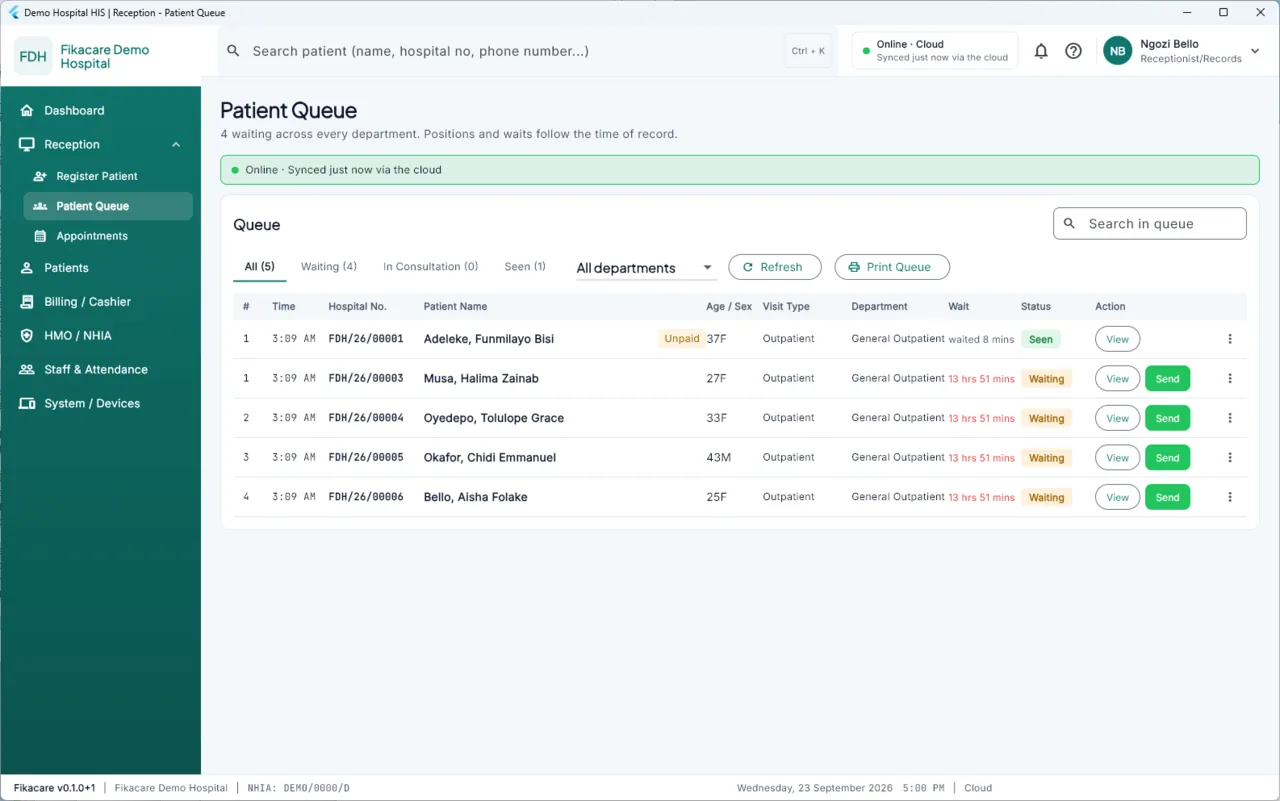
Choose Reception → Patient Queue.
The four tabs
All — everybody who has a visit open today. Waiting — arrived, not yet called. In Consultation — with a clinician now. Seen — finished with the department.
The count beside each tab is the number in it, which is the fastest read of how the morning is going. Beside the tabs, a department filter narrows the list to one queue.
Sending a patient on
Send on a row moves the patient to another department's queue — reception to the laboratory, the consulting room to the pharmacy. It is the same visit throughout; you are not opening a new one. View opens the visit.
It is shared, so read the banner
The queue is one of the screens most worth checking the banner on. It is assembled from what every machine has done, so if this machine has not synced for an hour, somebody may have been called in the consulting room without reception knowing.
If the banner is amber or red and the order matters, Refresh first.
Calling a patient
In the consulting room, choosing a patient in the queue moves them to In Consultation and opens the consultation screen. Reception sees the change once the machines next speak — usually within seconds on a working network.
Priority
Priority is set when the visit is opened and can be raised afterwards. A raised priority moves the patient up and records who raised it. The queue is not a strict first-come order and should not pretend to be — but every departure from it has a name against it.
Printing it
Print Queue prints the current list. Useful when a machine is going to be moved, when the power is about to go, or simply for the board.
What the queue feeds
Three of the figures in the daily brief come from here: the longest wait, how many are still waiting, and how many left without being seen. See The daily brief.